Delivery drivers
Your riders on their phones, the guest watching the ride live
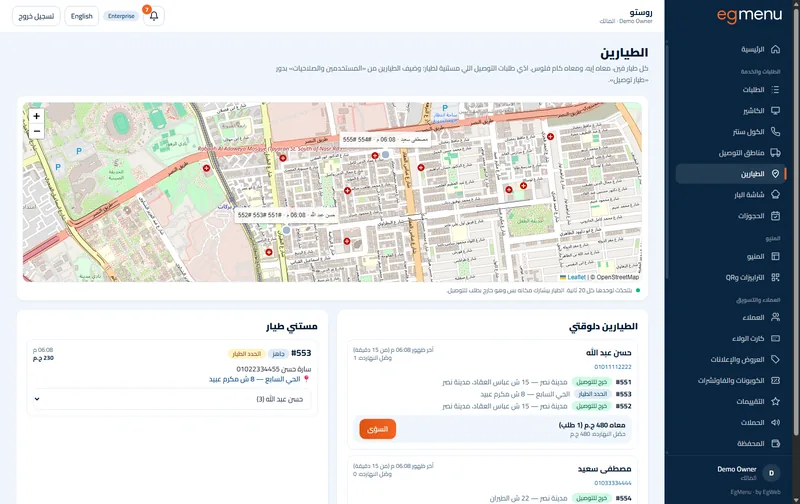
Give each order to a driver, follow them on a map, settle their cash.
In Complete · Enterprise
How it works
Delivery drivers, step by step
Assign. Order #64 goes to Hassan from the order board.
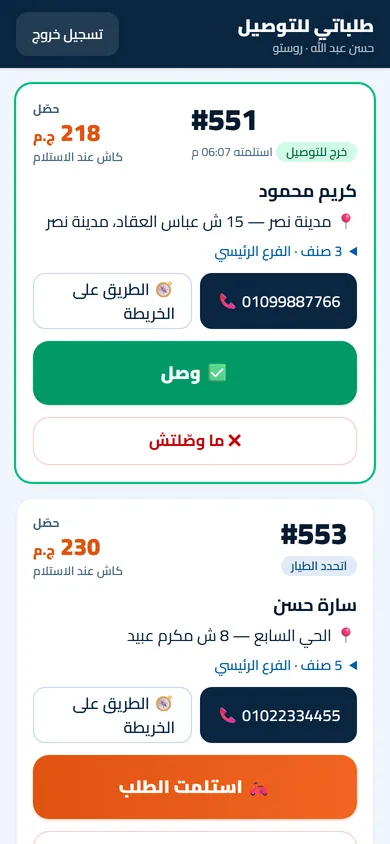
Picked up. Hassan taps picked up on his phone and heads out.
Live on the map. Karim watches the scooter come closer on the tracking page.
Delivered and settled. Delivered; the 205 EGP in cash settle into the shift.
Delivery drivers
What you get
A driver role
Each rider has their own login that opens one thing: their deliveries. Nothing else of the dashboard.
Assign from the board or the call center
Pick the driver on the order as it goes out, from the order board or the call-center screen; the cashier can too.
A driver screen on the phone
The rider sees the address, the amount to collect and a map button, and taps picked up, delivered, or could not deliver with the reason.
Live tracking for the guest
While the order is on its way the guest sees the rider move on the tracking map, from the same link as the order.
Cash settlement
The cash each driver collected shows against them until it is settled into the shift, so nothing goes missing between the road and the drawer.
Who is it for
In a cafe like Rosto A great fit
One rider for the morning coffee round, with the cash he brings back on record.
In a restaurant like Sofra A great fit
A delivery desk with several riders: who has what, where they are, and what cash each one holds.
Where you get it
- Not included Free Free
- Included Complete 1,250 EGP / month
- Included Enterprise Free
FAQ
Questions about Delivery drivers
Does the driver need an app?
No. The driver screen opens in the phone browser and can be added to the home screen like an app; the location is sent while an order is out for delivery.
What does the guest see?
The order’s tracking page: its steps, and while it is on the way, the rider moving on a map.
What if the delivery fails?
The driver marks it as not delivered with a reason; the order comes back to the board for the team to call the guest or send it again.
Which plan has it?
It comes with delivery: the Complete plan (delivery zones and online ordering) and the Enterprise plan.
Works well with

Online ordering
Pickup, delivery and scheduled orders. Every pound is yours.
In Complete · Enterprise

Call center and delivery
Find the caller by number, pick a zone, send it.
In Enterprise, contact us

Reports
Daily numbers, item performance, a heat map, comparisons, CSV and a weekly email.
In Complete · Enterprise
